Two kinds of status, and the coverage band
Every service on an engagement has a status, and every invitation under it has one too. They look similar and they answer different questions, which is where most confusion comes from.
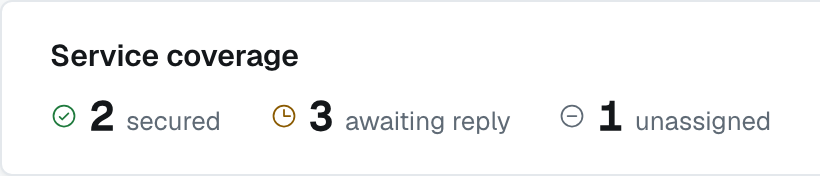
The Service coverage counts in the band at the top of an engagement add the services up three ways — how many are secured, how many are awaiting reply, and how many are still unassigned. Those three words are a count, not statuses; the statuses are on the rows underneath.
Beside them, the same band shows each firm's engagement status — not a service status. The lead firm sees every firm it has invited under Partner status; an invited firm sees one row, the lead firm's, under Lead firm status.
What a service row shows
This answers: has this piece of work found somebody yet?
- No badge at all, and the words "No firms have been invited to this service yet." Nobody has been asked. There's no such badge as "Unassigned" — the absence is the state, and the sentence is how the row says so.
- Invited — an invitation is out and nobody has answered.
- Accepted — an invited firm has said yes. It isn't theirs yet: the lead firm still has to award it.
- Awarded — an outside firm won the work.
- Resource Secured — the work went to one of your own employees instead. Different words from Awarded on purpose: one means another firm is doing it, the other means you are.
- Canceled — the service is out of play. This can happen at any point, even after an award: cancelling an awarded service also cancels the awarded firm's invitation.
Each invitation's status
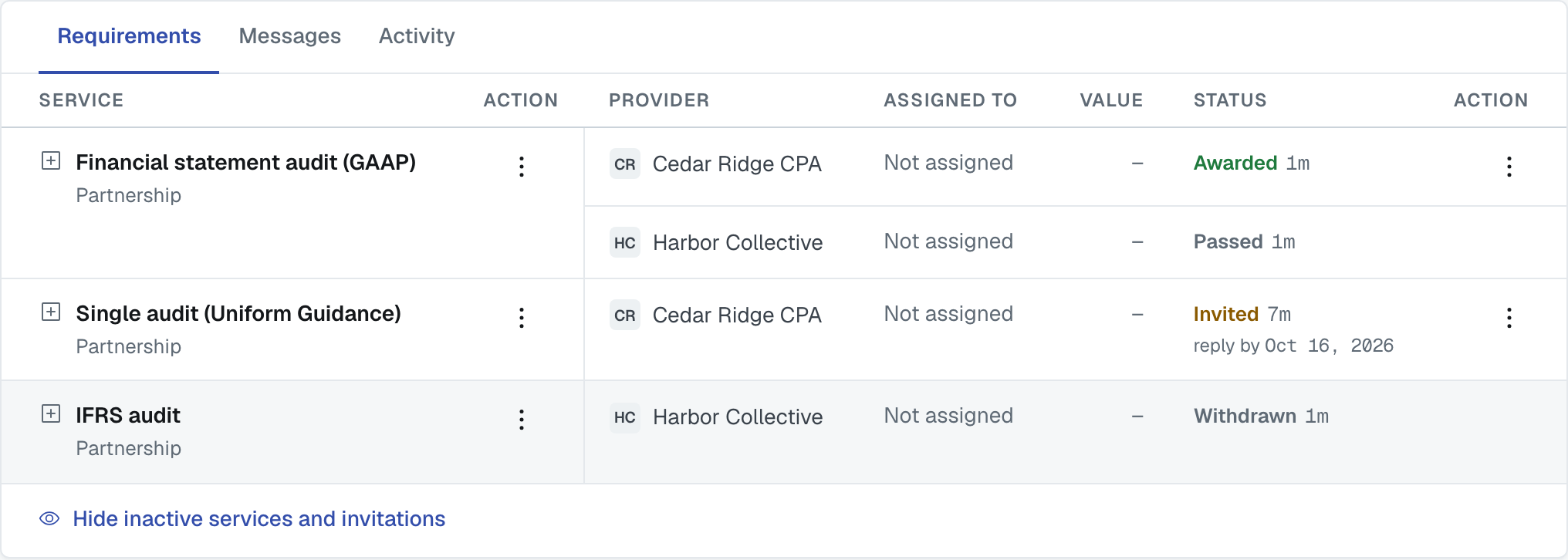
This answers: where does this one firm stand on this one service? Several firms can be invited to the same service and compete for it, so each invitation moves on its own.
- Invited — sent, not yet answered.
- In Review — the firm has opened the invitation, or has put one of its own people against it. It means "we're looking at this".
- Accepted — that firm said yes.
- Declined — that firm said no. It may leave a note explaining why; the lead firm sees the note, competing firms never do. A firm with several invitations can decline them all at once with Decline All — see Reading an engagement.
- Awarded — the lead chose that firm. The work is theirs.
- Passed — the lead chose somebody else. It isn't a judgement on the firm, it's the other side of an award.
- Terminated — the lead firm ended this firm's award.
- Withdrawn — the awarded firm pulled out of the work itself.
- Canceled — the lead firm called the invitation off before an award (Cancel Invite), or cancelled the service itself.
The two rules worth knowing
Awarding one firm passes the others automatically. You don't have to decline anybody: when you award a service, every other live invitation on it moves to Passed, and those firms are told.
You can award without waiting for an acceptance. A firm that hasn't answered yet can still be awarded the work — useful when you've spoken to them outside the app.
Ending an award: Terminate and Withdraw
An award isn't final. Either side can end it, and each side has its own word for it, on the ⋮ menu of the awarded invitation's row:
- Terminate is the lead firm's. A reason is optional. The firm's invitation moves to Terminated.
- Withdraw is the awarded firm's. A reason is required — the lead firm has to decide what happens next, so it is owed a sentence. The invitation moves to Withdrawn.
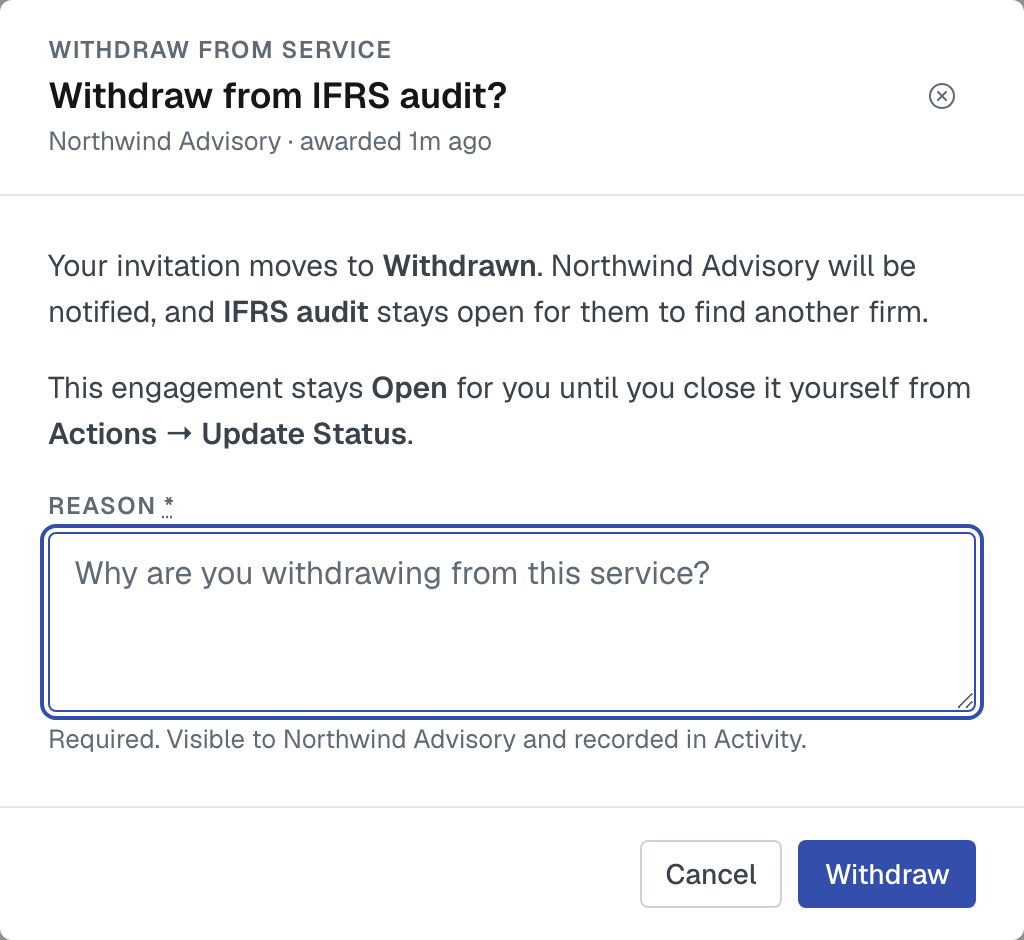
Either way, the service stays open. It goes back to looking for a firm, and the lead firm can use Find Firms on that same service to invite somebody else — just not the firm whose award ended. The ended invitation drops out of the table (Show inactive services and invitations brings it back), and its value stays on the record but stops counting toward the engagement's total.
Neither firm's engagement status changes. An awarded firm whose award ends stays Open until it closes the engagement itself from Actions › Update engagement status.
This is different from Cancel service, which ends the service itself: if the service was awarded, the awarded firm's invitation reads Canceled, and the only thing left on that service's menu is Duplicate service.
When you've declined everything
If you were invited and you decline your last open service on an engagement, with nothing awarded to you, FirmLinks asks whether you would like to close the engagement. Yes records it as Closed Declined; No leaves it at Invited so you can close it later. It never closes on its own. The Engagements list explains Closed Declined and how it differs from Closed Lost.
Respond by
An invitation can carry a Reply by date, set when it was sent. It's a request, not a switch: nothing happens automatically when it passes, nobody is chased by the system, and the invitation stays open. On the engagement it shows under the status only while the invitation is still Invited, and turns red once it has passed.
Why a declined or passed invitation is still on the page
It stays visible on purpose — you asked, they answered, and that's part of the record. Once a service has been awarded, the invitations that didn't win are tidied out of the way, and the link at the bottom of the services table brings everything hidden back into view.
Was this article helpful?
That’s Great!
Thank you for your feedback
Sorry! We couldn't be helpful
Thank you for your feedback
Feedback sent
We appreciate your effort and will try to fix the article