The form is on the same screen as the assistant
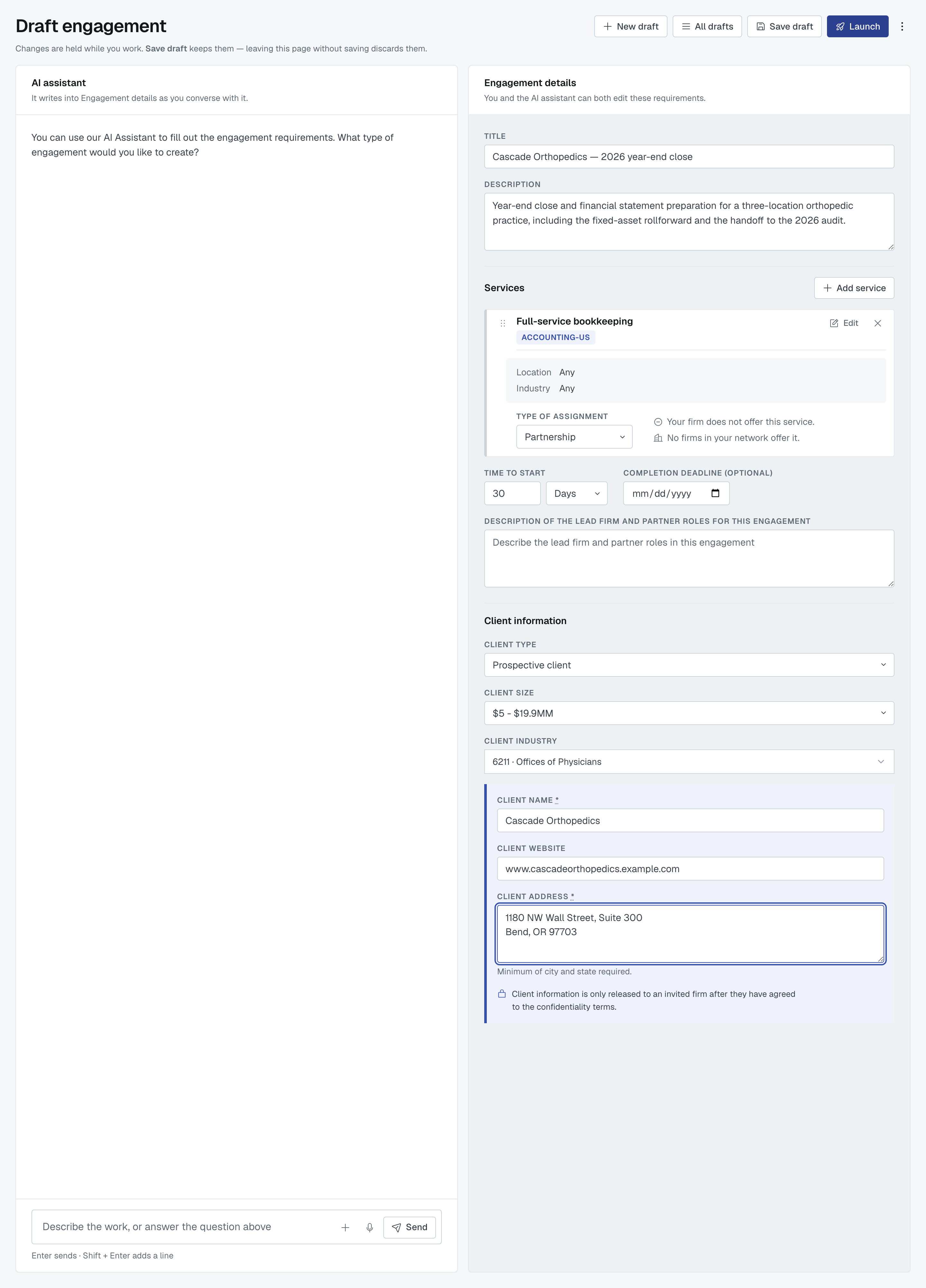
New engagement on the Engagements list opens Draft engagement: the AI assistant on the left, the engagement's details on the right. You do not have to talk to the assistant — type straight into the form and ignore the left side entirely. They are two ways into one engagement, not two records, so you can also start a sentence with the assistant and finish by hand.
If you'd rather describe the job in your own words and have the form filled in for you, read Create an engagement with the AI assistant instead.
Changes are held while you work. Save draft keeps them; leaving the page without saving discards them. Save as you go.
Title and description
Title is the engagement's name in every list, and it is capped at 80 characters. Description is the longer account of the work.
Both are required to launch, and both are read by every firm you invite — before any of them has seen who the client is. Keep the client's name out of them; Client confidentiality: what other firms see, and when explains why.
Services
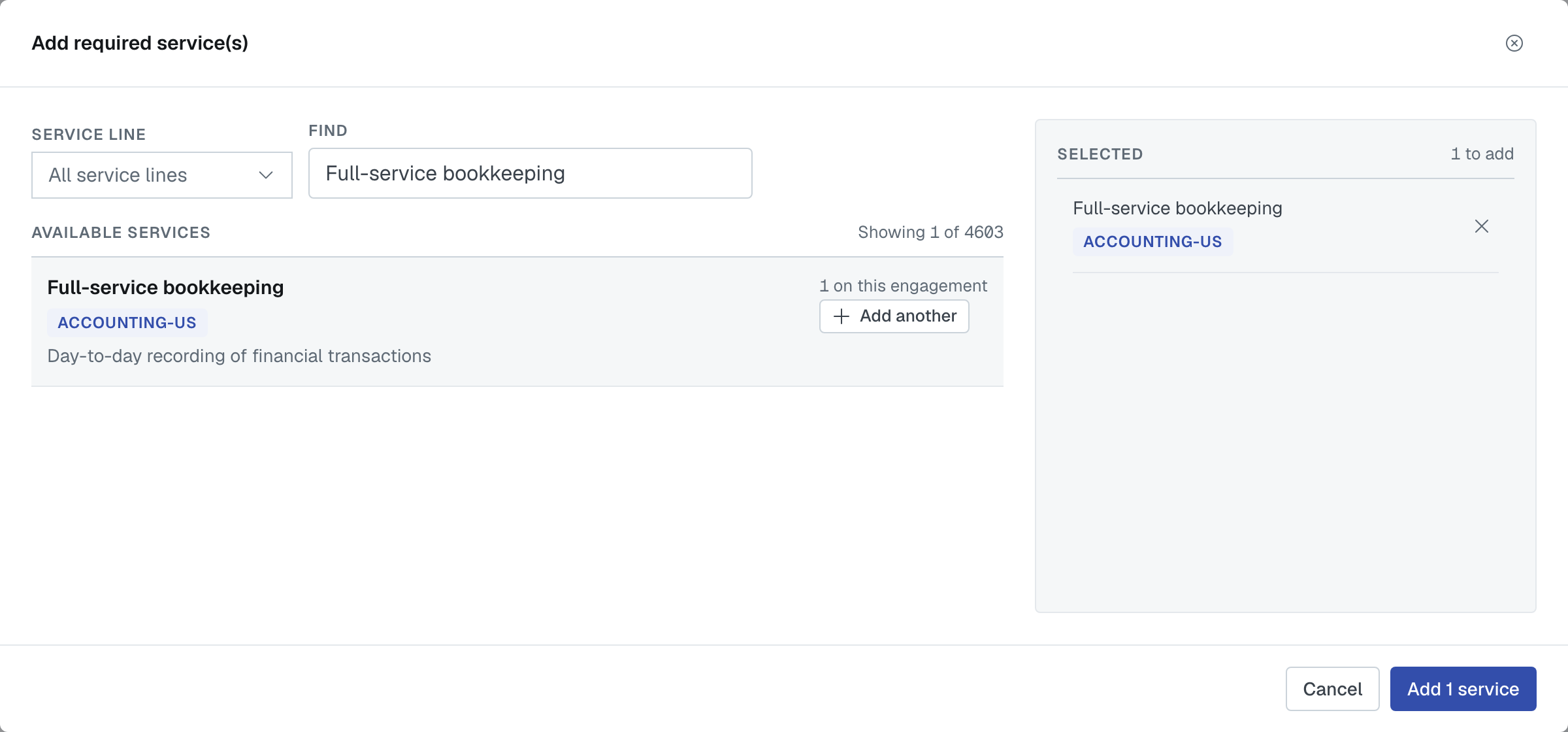
Add service opens Add required service(s). Narrow the catalogue with the Service line filter or the Find box, add what you need from Available services, and they gather under Selected. The filter only narrows the list: a service you add keeps every service line it belongs to, and they show as tags on its card.
The same service can be added more than once when the engagement genuinely needs it — an inventory count at each of four offices, say. A service already on the engagement shows how many times (2 on this engagement) and its button reads Add another.
Each service then gets its own card on the form. If you give a service a display name (with Edit on its card), the display name is the card's heading and the service's own name sits beneath it, so two copies of one service are easy to tell apart. Long names wrap onto the next line rather than being cut off. On the card, Type of assignment decides whether it goes to a partner firm or to one of your own people. The five kinds of arrangement are listed in Create an engagement with the AI assistant.
At least one service is required to launch. An engagement where every service is handled by your own staff is a perfectly valid one.
Time to start
Time to start is a number plus a unit — Hours, Days, Weeks or Months. It tells an invited firm how soon the work begins. Optional.
The role you want a partner to play
Description of the lead firm and partner roles for this engagement appears once at least one service is going outside your firm. Use it to say who is doing what — who faces the client, who signs, who reviews. Optional.
Client information
- Client type — one of Prospective client, Existing client or My organization is the client. Required.
- Client size — a band from the list. Optional.
- Client industry — chosen from the industry list. Optional, and nothing is ever picked for you here: a firm record has no single industry, so guessing one would look exactly like a choice you made.
- Client name — required, unless your own organization is the client.
- Client website — optional.
- Client address — required, unless your own organization is the client. The hint under it is the floor: minimum of city and state required. A full postal address is better where you have one.
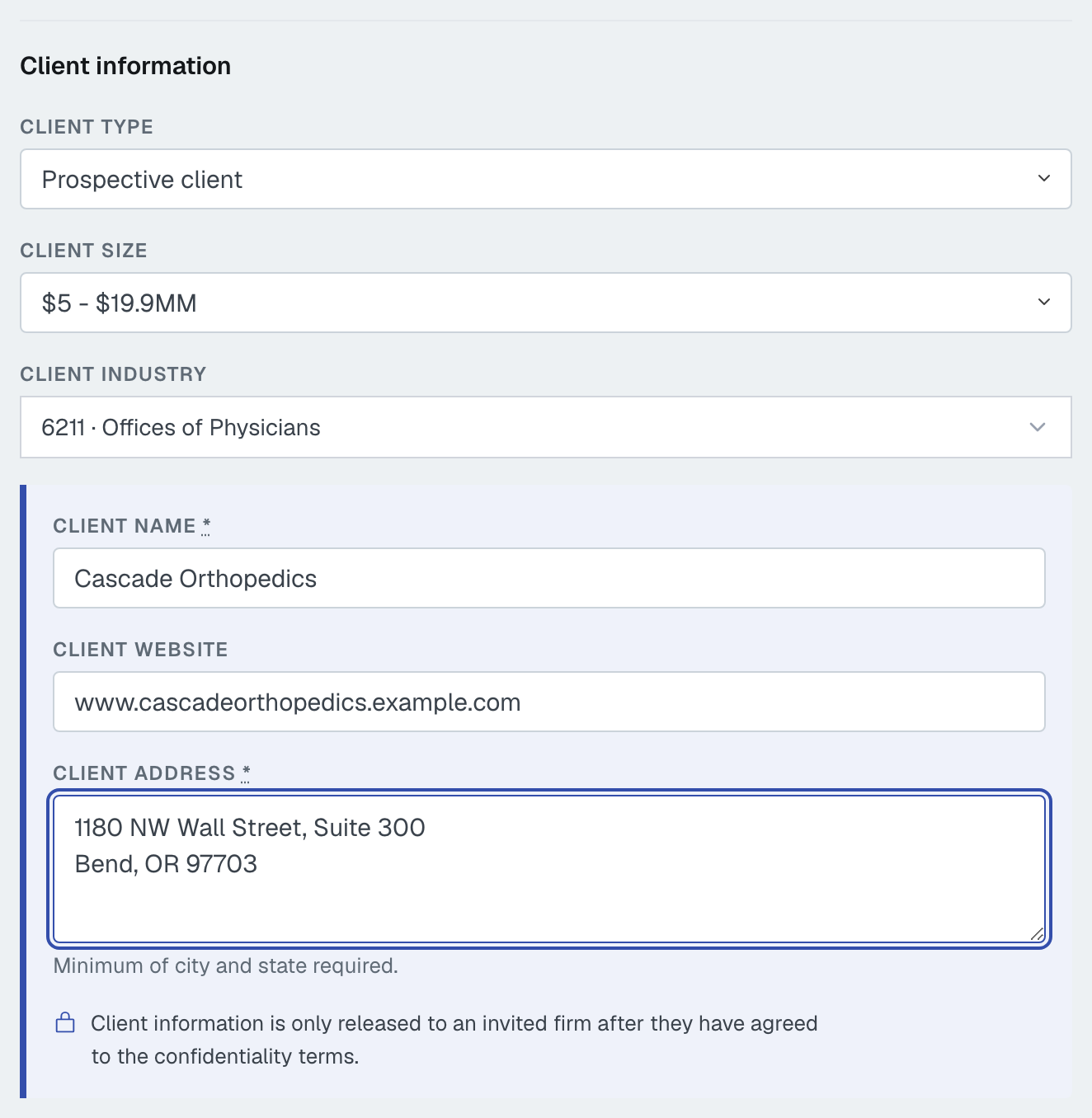
Those last three sit together in a marked group with a padlock, because they are the three FirmLinks withholds from an invited firm until that firm agrees to the confidentiality terms.
Choosing My organization is the client fills some of this in for you. Your firm's name, your website (from your primary verified domain) and your head-office address drop in — but only into fields that are still empty, so nothing you have already typed is overwritten. Industry is deliberately left for you.
What is actually required to launch
Four things, always:

- Title
- Description
- At least one service
- Client type
Plus two more whenever the client is somebody other than your own firm:
- Client name
- Client address
And one rule about repeated services: if the same service is on the engagement more than once, at least one copy needs a display name or a location, otherwise nobody could tell them apart. Launch refuses with "The same service is on this engagement more than once — give each one a unique display name and, if applicable, a location or industry." That sentence links to the first of the copies.
Everything else — website, size, industry, time to start, the partner role — is optional. Save draft is not gated at all: a half-filled draft is a normal thing to keep.
If something is missing when you press Launch, the page says so at the top — "This engagement can't be launched yet" — and names each field, for example "Add the client address." Fix them and press Launch again.
Launching
Launch turns the draft into a real engagement. No firm has been contacted at that point — inviting firms is a separate, deliberate step. See What happens after you launch an engagement.
Was this article helpful?
That’s Great!
Thank you for your feedback
Sorry! We couldn't be helpful
Thank you for your feedback
Feedback sent
We appreciate your effort and will try to fix the article