Why these two sit together
Both live on one screen, Collaboration Center › Open Networking, because they answer one question between them: can firms you've never met find you, and what do you offer them? Your referral incentive is part of open networking: it's what you offer the firms that find you that way.
Open networking

With it on, your firm can match with any other firm that also has it on — no group, no direct connection, nobody's approval.
Three things people get wrong about it:
It isn't a connection. Firms reached this way don't appear in your connected firms list, and you have no relationship with them until one of you invites the other onto something.
It's mutual. You match with firms that also have it on. Turning it on doesn't expose you to firms that haven't.
It's a matchability channel, not a directory listing. It doesn't add firms to your Connected Firms list or to a group.
Only an administrator can turn it on or off, and it's part of some plans and not others — where it isn't, the screen says so and points at the upgrade.
Turning it on and off

Collaboration Center › Open Networking holds a single switch (and, once it's on, your referral incentive below it). The heading beside it reads Open networking is on. or Open networking is off., so there's never any doubt which way round it is, and it takes effect the moment you click it — no confirmation, no request to anybody, no saving step.
Only administrators can change it. Everyone else sees the switch greyed out with the sentence Only administrators can change open networking beside it. If your plan doesn't include open networking the switch is also inert, and the screen names your plan — Your <plan> plan does not include open networking — with a link to upgrade. Turning it off is never blocked by either of those. One more gate: a Red Collaboration Score stops you turning it on, and can switch it off for you — see Your Collaboration Score.
Turning it off changes nothing you already have

Your existing relationships are untouched. Switching open networking off writes one setting on your firm and nothing else: your direct connections stay connected, your group memberships stay exactly as they were, requests waiting on either side stay waiting, and every engagement and invitation already under way carries on as if nothing happened.
What it changes is only who can find you from here on. Your firm drops out of the open-network pool, so firms with no group and no connection to you stop being matchable with you. Turn it back on and you're back in the pool — there's nothing to rebuild.
Your referral incentive is kept, but nobody sees it. While open networking is off, the incentive card disappears from the screen and your terms aren't shown to any firm. Turn it back on and the card comes back with what you wrote.
One thing that does switch it off as a side effect: downgrading to a plan that doesn't include it. The downgrade screen says so.
How many firms your open network reaches
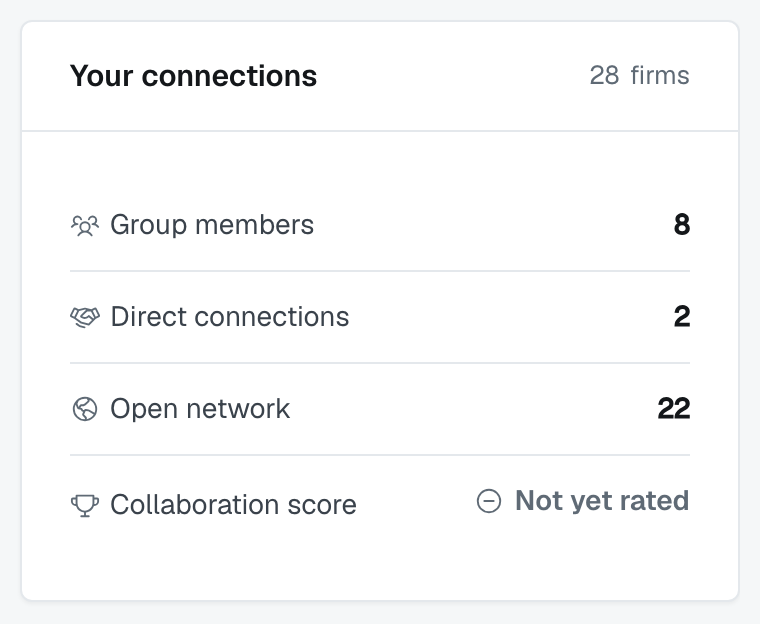
The Your connections card — beside the switch on this screen, on your dashboard rail, and in the Collaboration Center — carries an Open network row, and that's the number: how many other firms on FirmLinks currently have open networking on. Every one of them is matchable with you while yours is on too.
That row has three faces, and only one of them is a number. It reads a count when your plan includes open networking and your switch is on; it reads Off when you've switched it off, because with yours off there is nothing to count; and it reads Upgrade when your plan doesn't include it at all, linking to your subscription. The count deliberately sits outside your firms total on that card — these firms aren't connections. See Connections, groups and open networking: which to use.
Your referral incentive
Once open networking is on, a Your referral incentive card appears below the switch. It asks one question: Do you offer a referral incentive? — Yes or No.
Choose Yes and two boxes appear:
- Brief description — one line, shown beside your firm on a match ("30% of first-year revenue").
- Incentive details — your conditions ("based on cash received; we need to sign an agreement beforehand"), shown when the other firm opens the incentive.
Then click Save incentive. Only administrators can change it; everyone else sees the card greyed out.
Write the conditions you actually intend to hold to. It's read by firms deciding whether to send you a client, and the detail is where the awkward parts belong — agreements, when it's payable, whether it applies to existing clients.
Who these terms are for
Only firms that find you through open networking. The card says so: these are the terms your firm offers a firm that refers an engagement to you through the open network. There's no firm-wide default that applies anywhere else.
Each group asks its own question. When you create, join or apply to a group, you're asked Do you offer a referral incentive? for that group, and you can change it later on the group's Referral Incentive tab. Inside a group, those terms replace your open-networking terms.
A direct connection carries no incentive at all. A firm that's matched with you only through a direct connection sees no incentive from you.
Reusing terms you've already written
When you join or apply to a group, or edit your incentive for a group, a Copy existing terms from list offers the terms you've already written — for open networking, and for your other groups. Pick one and it fills the two boxes; you can edit them afterwards.
It's a copy, not a link. Changing your open-networking terms later doesn't change a group you copied them into — update each group yourself if it should follow.
Where your incentive shows up
On the Find firms screen, beside your firm, when another firm is choosing who to invite — one line for each way it reaches you that carries terms: the open network, and each group you share. So a firm that shares two groups with you may see two different offers from you. That's not a bug; it's what per-group terms mean. A direct connection adds no line.
Firms with nothing to offer show nothing. That's a perfectly normal answer — plenty of firms compete on capability alone.
Was this article helpful?
That’s Great!
Thank you for your feedback
Sorry! We couldn't be helpful
Thank you for your feedback
Feedback sent
We appreciate your effort and will try to fix the article